
The business landscape is evolving rapidly, and customer expectations are higher than ever. Today’s consumers demand instant access to information, seamless interactions, and round-the-clock service availability. While hiring additional staff isn’t always feasible for every business, there’s a revolutionary solution that’s making waves across industries: AI-powered digital signage and intelligent kiosk systems.
Enter the era of AI kiosks – sophisticated, lifelike digital assistants that can transform any ordinary screen into a powerful customer engagement tool. These aren’t your typical chatbots or static digital displays; we’re talking about advanced AI digital signage solutions that can serve as receptionists, information hubs, sales assistants, and help desks, all while maintaining the personal touch your customers crave.
The Evolution of Digital Customer Service
Traditional kiosks and digital signage have been around for years, but they’ve largely been limited to displaying static information or providing basic touch-screen navigation. The game has changed with the introduction of AI-powered systems that can engage in natural conversations, understand context, and provide personalized assistance.
Modern AI kiosks represent a paradigm shift from passive information displays to active, intelligent customer service agents. These systems combine cutting-edge artificial intelligence with lifelike 3D avatars, creating an experience that feels remarkably human while offering the reliability and availability that only digital solutions can provide.
Getting Started: You Don’t Need Expensive Hardware
One of the biggest misconceptions about implementing AI kiosks is that you need expensive, specialized hardware. The truth is, you can start your journey into AI digital signage with devices you likely already own.
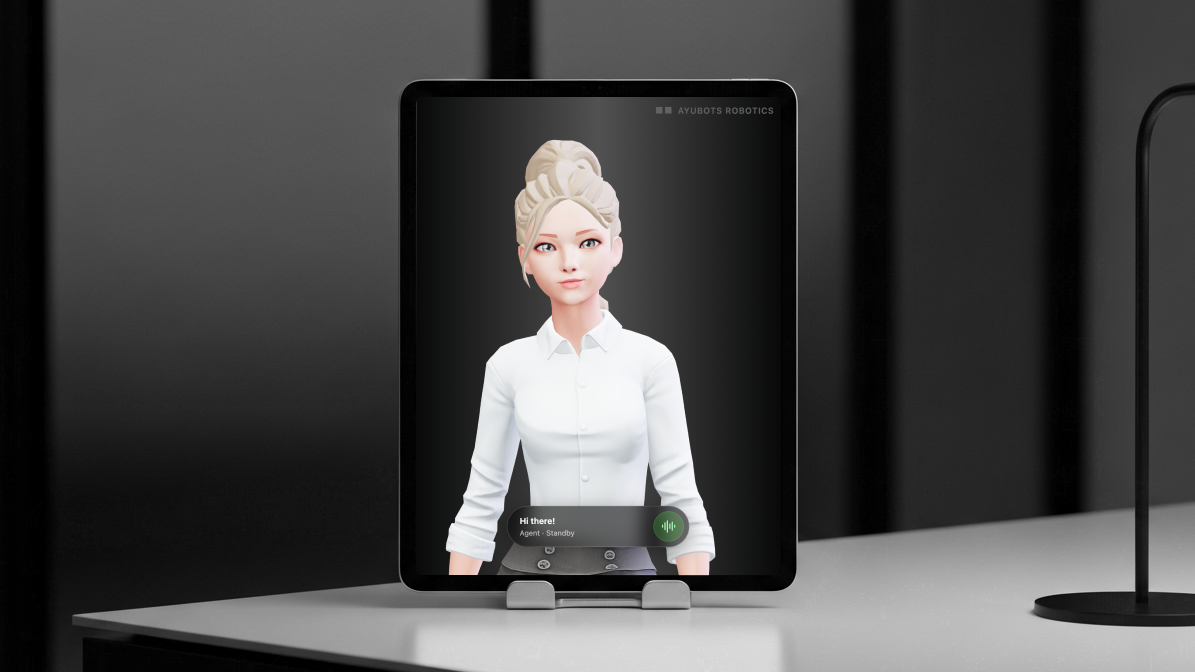
Starting Small with Tablets and iPads
If you’re new to AI kiosks or want to test the waters before making a larger investment, tablets and iPads offer an excellent entry point. These devices are perfect for:
- Counter-top interactions in retail environments
- Personal consultations in professional service offices
- Information desks in small waiting areas
- Mobile customer service that can move throughout your space
The beauty of starting with a tablet is that you can easily test different locations, gather customer feedback, and refine your approach before scaling up to larger installations. Many businesses discover that a simple iPad setup can handle a significant portion of their customer service needs, especially in low to medium-traffic environments.
Retrofitting Existing Digital Signage
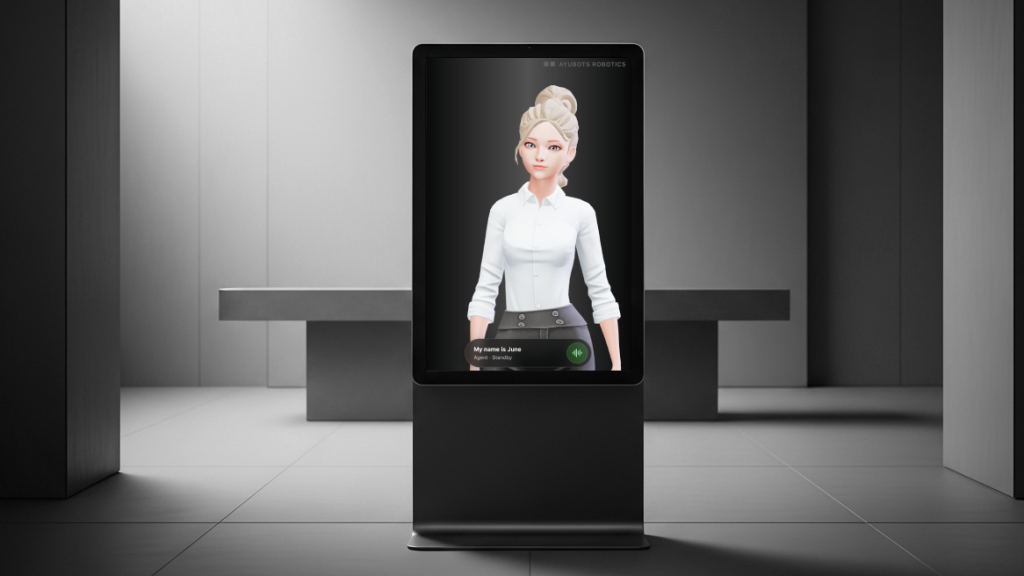
If your business already has digital displays or kiosks that are currently underutilized or displaying only static content, you’re sitting on untapped potential. Existing digital signage can often be transformed into intelligent AI kiosks with minimal hardware modifications.
The key requirements for retrofitting are surprisingly modest:
- A modern processor (most displays from the last five years qualify)
- Touch screen capability (or the ability to add a touch overlay)
- Audio input and output (microphone and speakers)
- Stable internet connectivity
This approach allows you to maximize your existing technology investment while dramatically expanding functionality. Instead of replacing expensive hardware, you’re simply upgrading the intelligence and capabilities of what you already own.
Choosing the Right Platform: Why Spatial Agents Stands Out
When selecting an AI kiosk solution, the platform you choose will determine everything from setup complexity to ongoing capabilities. Spatial Agents has emerged as a leading solution that addresses many of the common pain points associated with AI implementations.
What sets Spatial Agents apart is its focus on creating genuinely lifelike interactions. Rather than robotic responses or obviously artificial behavior, these AI agents are designed to feel surprisingly natural. They maintain the perfect balance between realism and functionality, avoiding the “uncanny valley” effect that can make some AI interactions feel uncomfortable.
The platform operates on a simple but powerful principle: each AI agent is trained to understand your specific business, products, and processes through natural conversation. Instead of complex programming or extensive setup procedures, you literally teach your AI agent by talking to it, much like you would train a new employee.
Step-by-Step Implementation Guide
Step 1: Assess Your Current Setup
Before diving into implementation, take inventory of your existing resources:
Existing Hardware Audit:
- Do you have tablets, iPads, or digital displays?
- What’s the condition and capability of your current devices?
- Where are the highest-traffic areas where customer interaction occurs?
- What power and internet connectivity options are available in these locations?
Business Needs Assessment:
- What customer service tasks consume the most staff time?
- When do you experience peak customer inquiry periods?
- What types of questions do customers ask most frequently?
- Which locations would benefit most from 24/7 assistance?
Step 2: Select Your Deployment Strategy
Based on your assessment, choose your initial deployment approach:
Pilot Program Approach: Start with a single tablet or existing display in your highest-traffic location. This allows you to:
- Test customer acceptance and engagement
- Refine your AI agent’s knowledge and responses
- Identify optimal placement and positioning
- Gather data on usage patterns and effectiveness
Multi-Point Deployment: If you’re confident in the technology and have identified multiple high-value locations, you can deploy several AI kiosks simultaneously. This approach works well for:
- Large retail spaces with multiple departments
- Corporate offices with various information needs
- Healthcare facilities with different service areas
- Hotels with lobby, concierge, and guest service functions
Step 3: Hardware Selection and Setup
For New Installations: The recommended system specifications for optimal performance include:
- Android 10 or newer operating system
- 1080p touchscreen display (portrait orientation preferred)
- Modern octa-core processor
- 4GB RAM minimum
- High-quality built-in microphone and speakers
- Reliable Wi-Fi connectivity
For Existing Kiosk Retrofits: Evaluate whether your current hardware meets the minimum requirements. Most digital signage systems manufactured in the last five years can support AI agent deployment with minimal modifications.
Installation Process: The actual setup process is refreshingly straightforward:
- Download and Install: For Android devices, install the Spatial Agents client app from the Google Play Store. For iPads and other devices, the system works through any modern web browser.
- Account Configuration: Follow the on-screen instructions to connect your device to your Spatial Agents account.
- Agent Assignment: Link your device to the specific AI agent you’ve created and trained for this location.
- Physical Mounting: Position your device at an appropriate height and angle for natural interaction. Consider factors like glare, accessibility, and traffic flow.
Step 4: Agent Training and Customization
This is where the magic happens. Unlike traditional software that requires programming, AI agents learn through conversation:
Initial Training Session: Spend time talking with your AI agent about your business. Cover topics like:
- Your products or services
- Common customer questions and concerns
- Business policies and procedures
- Hours of operation and contact information
- Specific terminology or jargon used in your industry
Ongoing Education: AI agents are designed to continuously learn and improve. As you encounter new situations or customer needs, you can teach your agent how to handle them through simple conversations.
Role Specialization: Different locations may require different expertise. You can train specialized agents for:
- Reception duties: Greeting visitors, providing directions, scheduling appointments
- Sales support: Product information, recommendations, pricing details
- Technical help: Troubleshooting, how-to instructions, support resources
- Information hub: Hours, policies, frequently asked questions
Step 5: Integration with Business Operations
Modern AI kiosks don’t operate in isolation. They’re designed to work alongside your human staff and existing business systems:
Team Collaboration: Your AI agents should know when to handle inquiries independently and when to escalate to human staff. This creates a seamless experience where customers receive immediate assistance for routine matters while complex issues are appropriately directed to qualified personnel.
Action Links and QR Codes: Advanced AI kiosks can do more than just talk. They can:
- Generate QR codes for instant contact information sharing
- Display relevant forms and documents
- Provide links to online resources
- Connect customers to specific staff members or departments
Data Collection and Analytics: Track the performance and impact of your AI kiosk deployment:
- Customer interaction frequency and duration
- Most common inquiries and requests
- Peak usage times and locations
- Customer satisfaction and feedback
Versatile Applications Across Industries
The flexibility of modern AI kiosks makes them valuable across virtually any industry:
Retail Environments:
- Product information and recommendations
- Store navigation and department locations
- Inventory availability and pricing
- Customer service and returns processing
Healthcare Facilities:
- Patient check-in and appointment scheduling
- Insurance and billing inquiries
- Facility navigation and department information
- Health education and resource sharing
Corporate Offices:
- Visitor registration and badge printing
- Employee directory and contact information
- Meeting room availability and booking
- Company policy and procedure information
Hospitality Industry:
- Guest check-in and concierge services
- Local attractions and dining recommendations
- Hotel amenities and service information
- Event and activity scheduling
Educational Institutions:
- Campus navigation and building directories
- Admissions and enrollment information
- Student services and resource access
- Event schedules and announcements
Cost Considerations and ROI
One of the most compelling aspects of AI kiosk implementation is the favorable economics. With solutions like Spatial Agents starting at $60 per agent per month, the cost is equivalent to roughly 10 cents per hour of operation.
Cost Comparison:
- Traditional receptionist: $15-25 per hour (plus benefits)
- AI kiosk agent: $0.10 per hour
- 24/7 availability with no breaks, sick days, or vacation time
- Consistent service quality regardless of time or circumstances
Return on Investment: Most businesses see positive ROI within the first few months through:
- Reduced staffing costs for routine inquiries
- Improved customer satisfaction through immediate assistance
- Increased sales through better product information and recommendations
- Enhanced operational efficiency and staff productivity
Future-Proofing Your Investment
As AI technology continues to evolve, platforms like Spatial Agents are designed to grow with your business. The expandable app ecosystem allows you to add new capabilities and features as they become available, ensuring your investment remains valuable over time.
Scalability Options:
- Start with a single location and expand gradually
- Add specialized agents for different business functions
- Integrate with additional business systems and processes
- Upgrade to more advanced hardware as needs grow
Making the Move to AI-Powered Customer Service
The transition to AI kiosks represents more than just a technology upgrade – it’s a fundamental shift in how businesses can deliver customer service. By combining the efficiency and availability of digital systems with the personal touch of human-like interaction, AI kiosks offer the best of both worlds.
Whether you’re starting with a simple tablet setup or retrofitting existing digital signage, the path to implementing AI kiosks is more accessible than ever. The key is to start where you are, with what you have, and grow your capabilities as you see results and gain experience.
The future of customer service is here, and it’s more approachable, affordable, and effective than you might have imagined. The question isn’t whether AI kiosks will become standard in business operations – it’s whether you’ll be an early adopter who gains the competitive advantage, or wait until everyone else catches up.
Your customers are ready for this level of service. Your business can benefit from this level of efficiency. The technology is mature and accessible. The only question remaining is: when will you make the move to transform your customer experience with AI-powered digital signage?